
Handling HTTP Callbacks
Many public APIs nowadays are using the concept of callbacks to notify API consumers of specific events. For example after phone call using Twilio ends it will perform a HTTP request to the specified URL to pass information about the status of the call. The DevKit provides a special data type to facilitate the scenario in which a Mule flow needs to be invoked when a HTTP callback is received.
The HttpCallback interface
Implementing HTTP callbacks can be tedious and cumbersome. The DevKit removes the complexity by creating a HTTP inbound endpoint automatically:
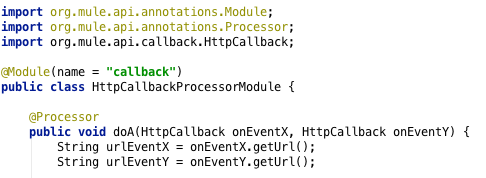
The HttpCallback interface exposes only one method that allows to get the URL of a dynamically generated HTTP inbound endpoint that references the flow that is to be invoked when the callback is received.
Allows to reference a flow in the Mule configuration file:
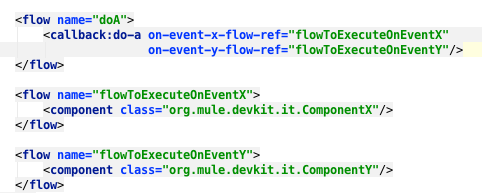
Note that the flows referenced do not have any inbound endpoint.
Advanced Configuration
If the default configuration is not suitable, the following settings can be used in the Mule configuration file:
| Attribute Name | Description |
|---|---|
localPort |
the port to be used to create the HTTP inbound endpoint. Defaults to environment variable |
remotePort |
the public port to be used to construct the public URL to be sent to the external system. Defaults to environment variable |
domain |
the domain to be used to construct the the public URL to be sent to the external system. Defaults to environment variable |
async |
possible values are |
For example:

All the attributes are optional and take default values as explained above.
How It Works
Behind the scenes a Mule flow is created dynamically containing a Message Processor that invokes the desired flow. By default, this Message Processor is wrapped in a async message processor chain. This behavior can be overridden using the 'async' option.
The URL of the HTTP inbound endpoint is built using 'localhost' as host and 'http.port' environment variable or 'localPort' value as port. The path of the URL is a random string.
The URL that is passed to the external system is the same one as the URL of the HTTP inbound endpoint except that the host is replaced by the 'domain' setting (or its default value) and the port is replaced by the 'remotePort' setting (or its default value).