
Managing Mule Runtime Patch Updates
The following provides important information about Mule runtime engine patch updates and the Mule runtime engine release channels for Anypoint Runtime Fabric.
Monthly Date-Patch Updates
Once per month, MuleSoft releases a date-patch update, which includes backward-compatible bug fixes to address any issues discovered in Mule runtime engine. The monthly date-patch update might include security patches if the scheduled date is within the security SLA.
The format of the version number for these updates is:
Major.Minor.Patch - Date
Here’s an example version number, including the patch date:
4.3.0:20210101
The monthly patches update applications only to the latest date-patch. They do not change the runtime version.
Runtime Fabric Mule Runtime Patch Update Schedule
Runtime Fabric runs each application and gateway deployment on a separate Mule runtime instance. By managing the containerized Mule images used for these deployments, Runtime Fabric enables you to upgrade your Mule runtime version for each deployment on the following schedule:
-
On the first full week of the month, you have access to new date-patches of updated Mule runtime instances.
-
During the next two weeks, you can redeploy your applications using the newer date-patch to validate its behavior. This is known as a grace period.
-
Beginning on the third full week of the month, you must select the latest date-patch of your chosen Mule runtime version when deploying a new application, or when making a change to an existing application.
During the grace period, you can select earlier date-patch versions until they are no longer available through the Runtime Manager UI but still usable through the API. Note that this behavior changes starting with Mule runtime engine version 4.5 with Edge and LTS channel releases. All build tags are available in the Runtime Manager UI and API.
Update a Single App to the Latest Runtime Patch Release
Before updating apps in the production environment, update them in the sandbox environment and run required tests.
To update an app to the latest date patch:
-
In the Runtime Manager navigation menu, click Applications.
-
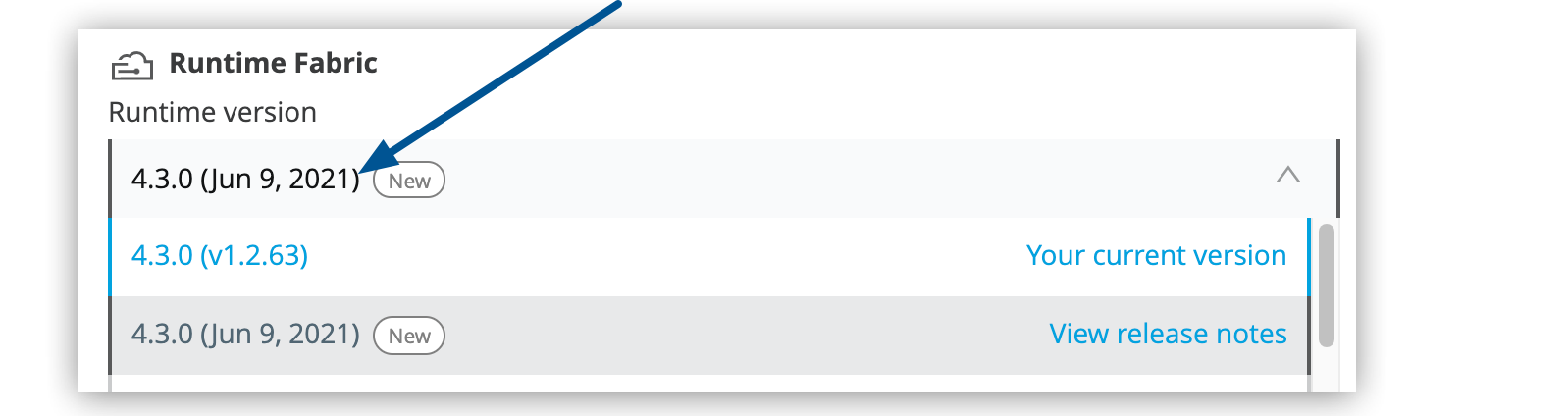
Under Deployment Target, from the Runtime version list, select the version tagged
new:
Although the version number of the update might be the same as the installed version, a later date identifies the update:
-
If you want to see details about the version, click the Read release notes link.
-
Click Apply Changes to update the app.
Runtime Fabric updates the app with the version you selected and displays a message indicating success or failure.
-
Redeploy your application.
Mule deployments on Runtime Fabric are not automatically patched. You must redeploy your applications to apply the latest date-patch updates.
Edge and LTS Releases for Mule
Unresolved include directive in modules/ROOT/pages/runtime-patch-updates.adoc - include::release-notes::partial$mule-runtime/mule-lts-edge-release-cadence.adoc[]
Unresolved include directive in modules/ROOT/pages/runtime-patch-updates.adoc - include::release-notes::partial$mule-runtime/mule-lts-edge-release-cadence.adoc[]
Unresolved include directive in modules/ROOT/pages/runtime-patch-updates.adoc - include::release-notes::partial$mule-runtime/mule-lts-edge-release-cadence.adoc[]
| Action | Runtime Fabric |
|---|---|
Deploy net new apps Unresolved include directive in modules/ROOT/pages/runtime-patch-updates.adoc - include::release-notes::partial$mule-runtime/mule-lts-edge-release-cadence.adoc[] |
Auto-upgrade Unresolved include directive in modules/ROOT/pages/runtime-patch-updates.adoc - include::release-notes::partial$mule-runtime/mule-lts-edge-release-cadence.adoc[] |
Self-upgrade Unresolved include directive in modules/ROOT/pages/runtime-patch-updates.adoc - include::release-notes::partial$mule-runtime/mule-lts-edge-release-cadence.adoc[] |
Rollback Unresolved include directive in modules/ROOT/pages/runtime-patch-updates.adoc - include::release-notes::partial$mule-runtime/mule-lts-edge-release-cadence.adoc[] |
Restart apps Unresolved include directive in modules/ROOT/pages/runtime-patch-updates.adoc - include::release-notes::partial$mule-runtime/mule-lts-edge-release-cadence.adoc[] |
Keep running applications Unresolved include directive in modules/ROOT/pages/runtime-patch-updates.adoc - include::release-notes::partial$mule-runtime/mule-lts-edge-release-cadence.adoc[] |
End of Extended Support Unresolved include directive in modules/ROOT/pages/runtime-patch-updates.adoc - include::release-notes::partial$mule-runtime/mule-lts-edge-release-cadence.adoc[] |
Retirement Unresolved include directive in modules/ROOT/pages/runtime-patch-updates.adoc - include::release-notes::partial$mule-runtime/mule-lts-edge-release-cadence.adoc[] |
Unresolved include directive in modules/ROOT/pages/runtime-patch-updates.adoc - include::release-notes::partial$mule-runtime/mule-lts-edge-release-cadence.adoc[]
Runtime Fabric
Unresolved include directive in modules/ROOT/pages/runtime-patch-updates.adoc - include::release-notes::partial$mule-runtime/mule-lts-edge-release-cadence.adoc[]
Runtime Fabric requires Unresolved include directive in modules/ROOT/pages/runtime-patch-updates.adoc - include::release-notes::partial$mule-runtime/mule-lts-edge-release-cadence.adoc[]
Unresolved include directive in modules/ROOT/pages/runtime-patch-updates.adoc - include::release-notes::partial$mule-runtime/mule-lts-edge-release-cadence.adoc[]
After you select the option Use Edge Release Channel in the Runtime Manager UI, the platform shows all the build tags for Edge and LTS channels. The build tag is specific to Runtime Manager and CloudHub 2.0 because the image can be built multiple times for a given Mule runtime version. The Runtime Manager UI does not show build tags for Mule runtime engine versions < 4.5 but you can still use any build through the API.
Version Rewrite
Version rewrite used to override the build tag specified in a deployment request if the build tag was out of support or invalid. Starting October 3, 2023, version rewrite does not override any specified tags for any version. However, if a Mule app is deployed through the API without a build tag, the latest build is auto-selected.